
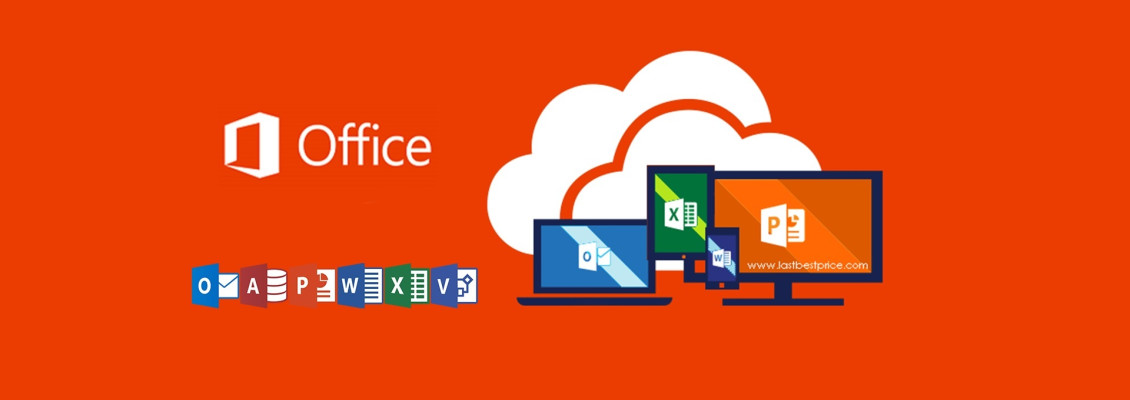
Microsoft offers several choices to activate your office 2021 5PC . In this article, it is online key and you do not need phone.
First Step : Download Office 2021 5PC
Before you start activation, make sure to install the office from the below links.
DOWNLOAD OFFICE 2021 5PC PROFESSIONAL PLUS (ENGLISH)
DOWNLOAD OFFICE 2021 5PC PROFESSIONAL PLUS (GERMAN)
DOWNLOAD OFFICE 2021 5PC PROFESSIONAL PLUS (DUTCH)
DOWNLOAD OFFICE 2021 5PC PROFESSIONAL PLUS (FRENCH)
DOWNLOAD OFFICE 2021 5PC PROFESSIONAL PLUS (ARABIC)
DOWNLOAD OFFICE 2021 5PC PROFESSIONAL PLUS (SPANISH)
DOWNLOAD OFFICE 2021 5PC PROFESSIONAL PLUS (ITALIAN)
DOWNLOAD OFFICE 2021 5PC PROFESSIONAL PLUS (SWEDISH)
DOWNLOAD OFFICE 2021 5PC PROFESSIONAL PLUS (UKRAINIAN)
DOWNLOAD OFFICE 2021 5PC PROFESSIONAL PLUS (CROATIAN)
DOWNLOAD OFFICE 2021 5PC PROFESSIONAL PLUS (POLISH)
DOWNLOAD OFFICE 2021 5PC PROFESSIONAL PLUS (ROMANIAN)
*IMPORTANT: Delete all existing versions of Office on your machine.
* You don’t see your preferred language? Please contact us to get the product in your language.
Second Step : Buy your unique License key
Before starting the installation of office 2019 you must have a valid license key to proceed with the activation
Third Step : Install Office 2021
After completing your download and buying your office 2019 Pro Plus License Key, you can open it on Windows 10 using Windows Explorer, by using a right mouse click. Then, double click on Setup file.
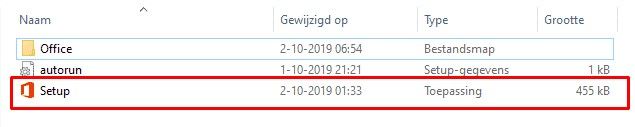
After executing the file the installation will start. It may take several minutes or more.
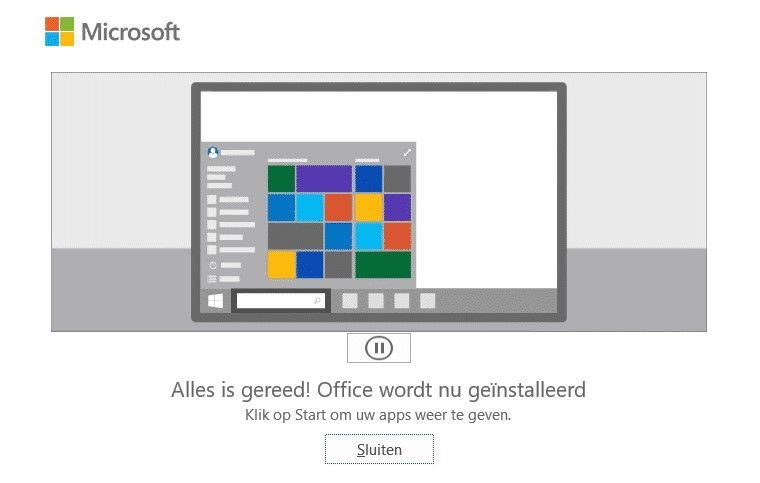
When the installation completes you’ll see the following screen on your device.
Fourth Step : Activate your office 2019 Pro Plus
1
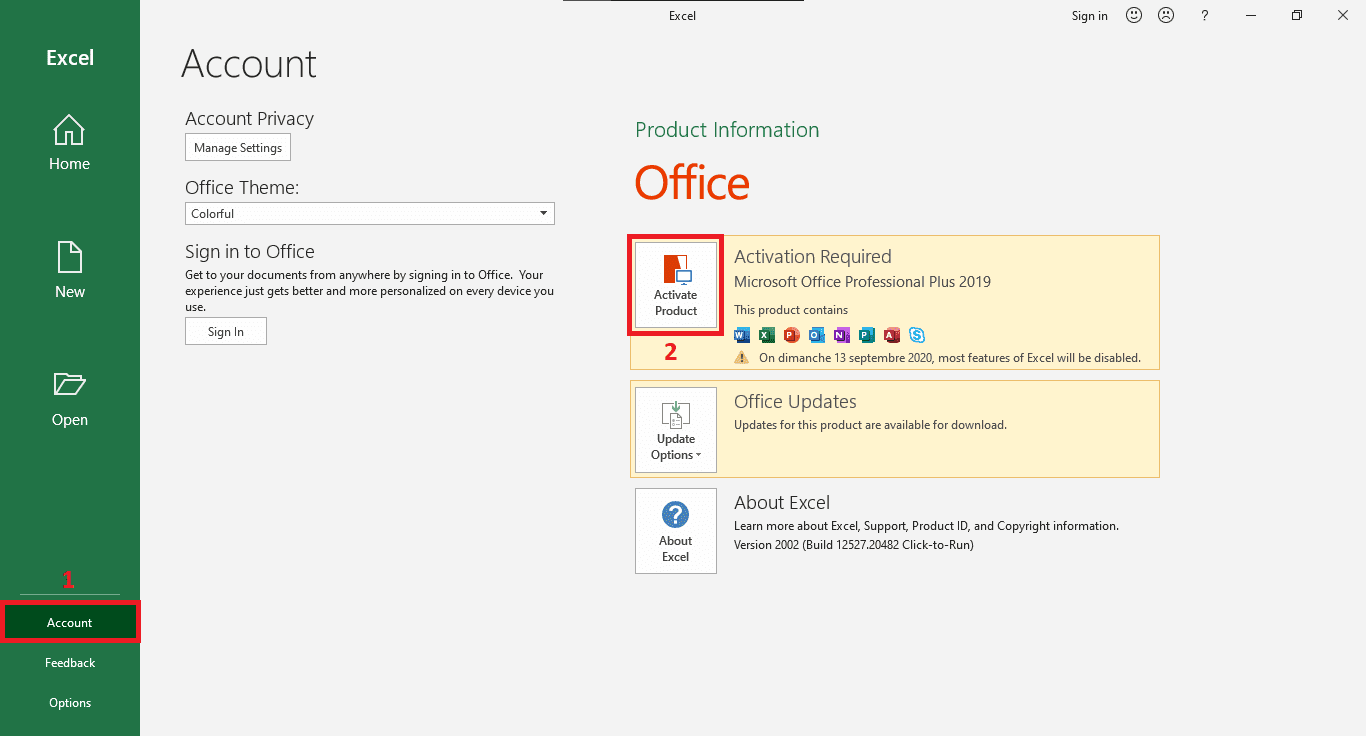
After completing the installation, you can activate the product by opening one of the office applications like Excel from the main menu. (1) Go to “Account”. Then, (2) Click in “Activate Product” to proceed the activation.
2
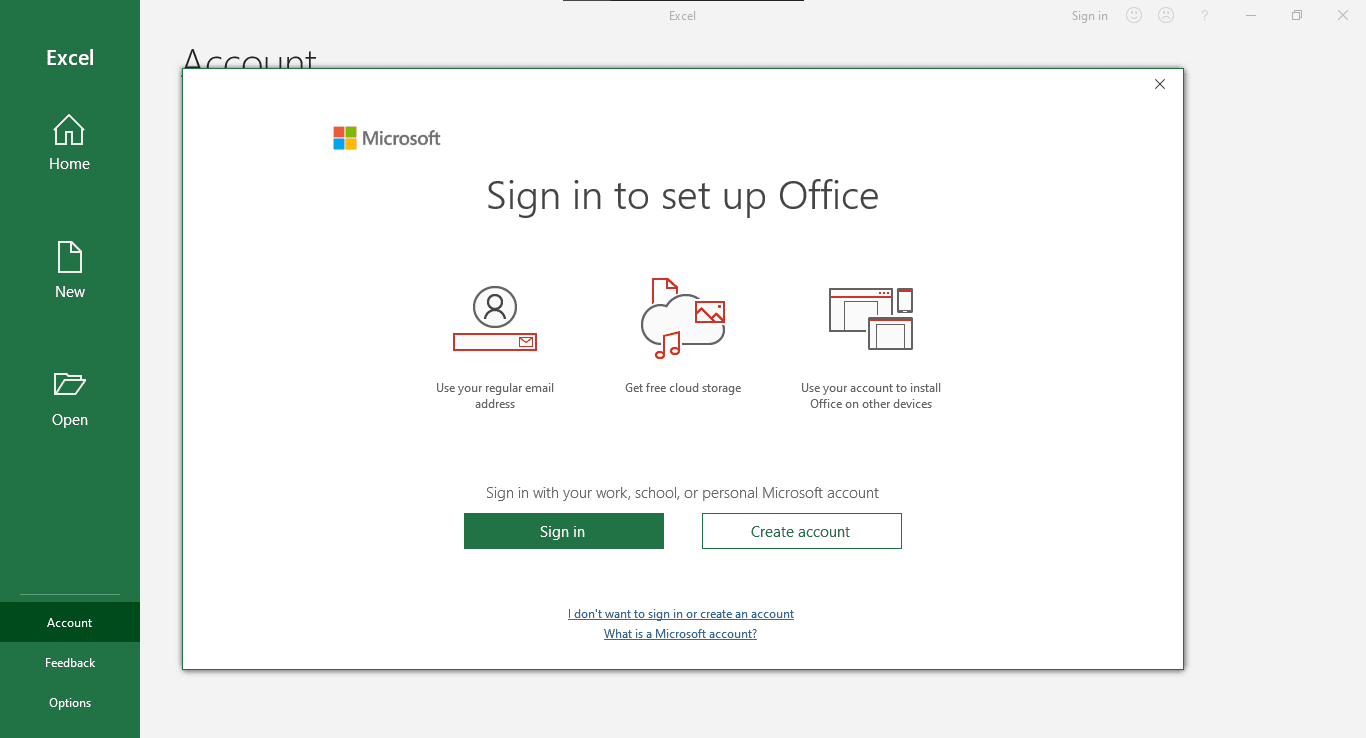
Sign in to your Microsoft account or create a new one from here.
3
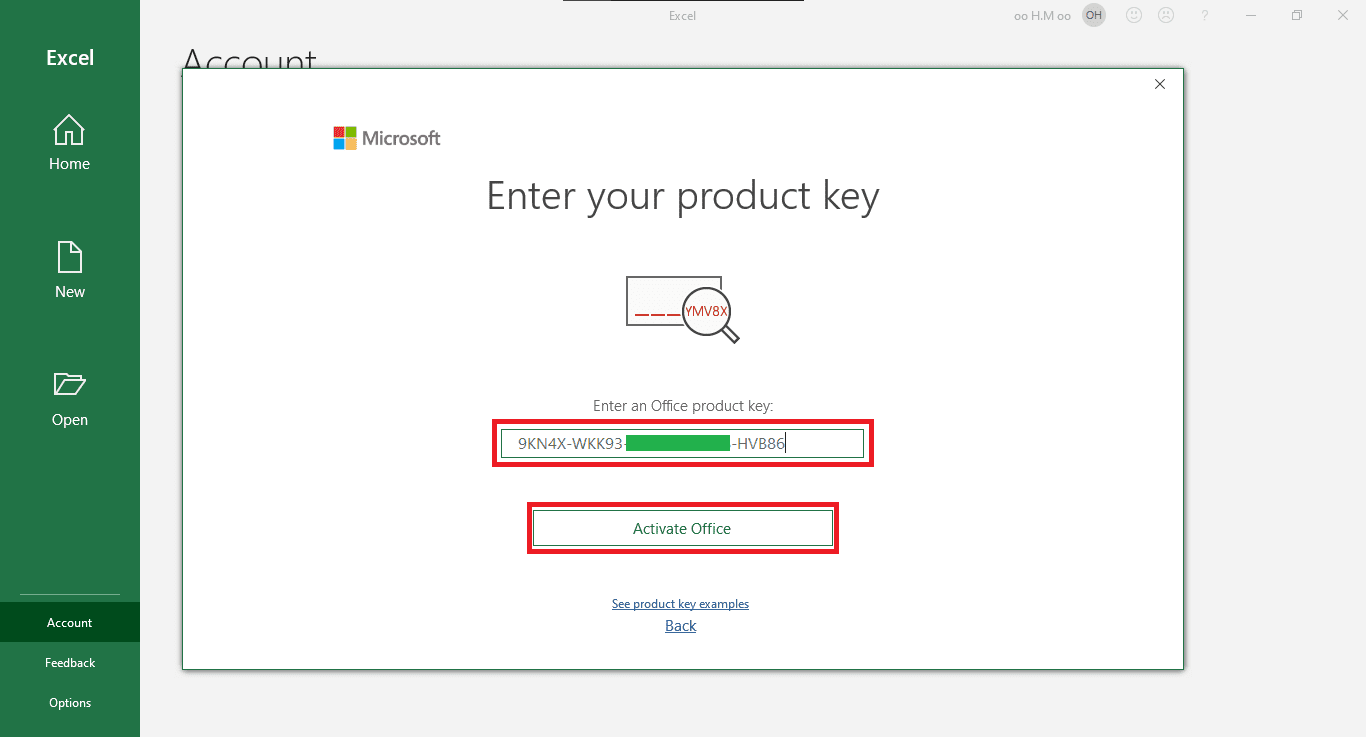
Enter your valid product key purchased. Then, click “Activate Office”.
33 Comment(s)
Các trò chơi của FB88 rất dễ hiểu, tôi có thể chơi ngay mà không cần tìm hiểu quá nhiều.
Các khuyến mãi nạp tiền trên FB88 rất tốt, tôi luôn cảm thấy có lợi khi tham gia.
Giao diện nền tảng đơn giản và dễ sử dụng, rất tiện lợi.
LG VINA COSMETICS CO., LTD., established in 1997, takes pride in bringing renowned cosmetic brands and premium home and personal care brands to Vietnamese customers. We currently operate in two main categories: Beauty and HDB (Home Care and Daily Beauty). The Beauty category includes products from skincare, cosmetics, and functional food groups, while the HDB category covers products in home care and daily personal care groups. With a vision to become a leading company in the beauty and health industry, we are meticulous at every stage of management to ensure that our products are of the highest quality and meet customer needs.
LG VINA COSMETICS CO., LTD., established in 1997, takes pride in bringing renowned cosmetic brands and premium home and personal care brands to Vietnamese customers. We currently operate in two main categories: Beauty and HDB (Home Care and Daily Beauty). The Beauty category includes products from skincare, cosmetics, and functional food groups, while the HDB category covers products in home care and daily personal care groups. With a vision to become a leading company in the beauty and health industry, we are meticulous at every stage of management to ensure that our products are of the highest quality and meet customer needs.
15 Lê Quang Định, Phường 9, Vũng Tàu, Bà Rịa - Vũng Tàu 792683, Việt Nam
LiveBet là một nền tảng giải trí trực tuyến sáng tạo, cung cấp cược thể thao trực tiếp và nhiều tính năng tương tác. Dù bạn là fan của bóng đá, bóng rổ hay các giải đấu eSports, LiveBet đều mang đến cho bạn trải nghiệm cược hấp dẫn. Với hệ thống cập nhật tỷ lệ cược nhanh chóng, bạn có thể cược trong suốt trận đấu và tận dụng mọi cơ hội chiến thắng. Các phương thức thanh toán an toàn và dịch vụ khách hàng 24/7 đảm bảo bạn chơi mà không lo lắng. Tham gia LiveBet ngay hôm nay để trải nghiệm cược trực tuyến tiên tiến nhất!
LiveBet là một nền tảng giải trí trực tuyến sáng tạo, cung cấp cược thể thao trực tiếp và nhiều tính năng tương tác. Dù bạn là fan của bóng đá, bóng rổ hay các giải đấu eSports, LiveBet đều mang đến cho bạn trải nghiệm cược hấp dẫn. Với hệ thống cập nhật tỷ lệ cược nhanh chóng, bạn có thể cược trong suốt trận đấu và tận dụng mọi cơ hội chiến thắng. Các phương thức thanh toán an toàn và dịch vụ khách hàng 24/7 đảm bảo bạn chơi mà không lo lắng. Tham gia LiveBet ngay hôm nay để trải nghiệm cược trực tuyến tiên tiến nhất!
Chế độ VIP của FB88 rất hoàn chỉnh, phần thưởng phong phú.
Các chương trình khuyến mãi của FB88 luôn được cập nhật thường xuyên, khiến tôi luôn cảm thấy thú vị.
Giao diện nền tảng đơn giản và dễ sử dụng, rất tiện lợi.
Tôi rất thích các trò chơi bài trên FB88, chúng rất thú vị và dễ chơi.
FB88 cung cấp rất nhiều loại game casino, không thiếu lựa chọn nào.
FB88 luôn cung cấp một môi trường chơi game an toàn và bảo mật.
LiveBet là một nền tảng giải trí trực tuyến sáng tạo, cung cấp cược thể thao trực tiếp và nhiều tính năng tương tác. Dù bạn là fan của bóng đá, bóng rổ hay các giải đấu eSports, LiveBet đều mang đến cho bạn trải nghiệm cược hấp dẫn. Với hệ thống cập nhật tỷ lệ cược nhanh chóng, bạn có thể cược trong suốt trận đấu và tận dụng mọi cơ hội chiến thắng. Các phương thức thanh toán an toàn và dịch vụ khách hàng 24/7 đảm bảo bạn chơi mà không lo lắng. Tham gia LiveBet ngay hôm nay để trải nghiệm cược trực tuyến tiên tiến nhất!
Trường Tiểu học Nguyễn Trung Trực được thành lập năm 1985 có địa chỉ tại 9A Phạm Hồng Thái, phường Nguyễn Trung Trực, quận Ba Đình, Hà Nội (Nay thành phường Trúc Bạch). Trường hoạt động dưới sự quản lý của UBND quận Ba Đình và Phòng Giáo dục và Đào tạo Ba Đình. Trường được xây dựng khang trang trên diện tích hơn 3000 m2 với đủ các phòng học và phòng chức năng cho các hoạt động học tập, vui chơi, giải trí của học sinh.
Địa chỉ: Số 9A Phạm Hồng Thái - Ba Đình - Hà Nội
Email: s666@s666s666s.com
website: Https://s666s666s.com/
Điện thoại: 438261441
Trường Tiểu học Nguyễn Trung Trực được thành lập năm 1985 có địa chỉ tại 9A Phạm Hồng Thái, phường Nguyễn Trung Trực, quận Ba Đình, Hà Nội (Nay thành phường Trúc Bạch). Trường hoạt động dưới sự quản lý của UBND quận Ba Đình và Phòng Giáo dục và Đào tạo Ba Đình. Trường được xây dựng khang trang trên diện tích hơn 3000 m2 với đủ các phòng học và phòng chức năng cho các hoạt động học tập, vui chơi, giải trí của học sinh.
Địa chỉ: Số 9A Phạm Hồng Thái - Ba Đình - Hà Nội
Email: s666@s666s666s.com
website: Https://s666s666s.com/
Điện thoại: 438261441
hey there and thank you for your info – I have definitely picked up anything new from right here. I did however expertise several technical issues using this web site, since I experienced to reload the site lots of times previous to I could get it to load properly. I had been wondering if your hosting is OK? Not that I am complaining, but slow loading instances times will often affect your placement in google and can damage your high quality score if ads and marketing with Adwords. Well I'm adding this RSS to my email and can look out for a lot more of your respective fascinating content. Make sure you update this again soon.
Các trò chơi của FB88 rất dễ hiểu, tôi có thể chơi ngay mà không cần tìm hiểu quá nhiều. Các khuyến mãi nạp tiền trên FB88 rất tốt, tôi luôn cảm thấy có lợi khi tham gia. Giao diện nền tảng đơn giản và dễ sử dụng, rất tiện lợi.
LG VINA COSMETICS CO., LTD., established in 1997, takes pride in bringing renowned cosmetic brands and premium home and personal care brands to Vietnamese customers. We currently operate in two main categories: Beauty and HDB (Home Care and Daily Beauty). The Beauty category includes products from skincare, cosmetics, and functional food groups, while the HDB category covers products in home care and daily personal care groups. With a vision to become a leading company in the beauty and health industry, we are meticulous at every stage of management to ensure that our products are of the highest quality and meet customer needs.
LG VINA COSMETICS CO., LTD., established in 1997, takes pride in bringing renowned cosmetic brands and premium home and personal care brands to Vietnamese customers. We currently operate in two main categories: Beauty and HDB (Home Care and Daily Beauty). The Beauty category includes products from skincare, cosmetics, and functional food groups, while the HDB category covers products in home care and daily personal care groups. With a vision to become a leading company in the beauty and health industry, we are meticulous at every stage of management to ensure that our products are of the highest quality and meet customer needs.
15 Lê Quang Định, Phường 9, Vũng Tàu, Bà Rịa - Vũng Tàu 792683, Việt Nam
LiveBet là một nền tảng giải trí trực tuyến sáng tạo, cung cấp cược thể thao trực tiếp và nhiều tính năng tương tác. Dù bạn là fan của bóng đá, bóng rổ hay các giải đấu eSports, LiveBet đều mang đến cho bạn trải nghiệm cược hấp dẫn. Với hệ thống cập nhật tỷ lệ cược nhanh chóng, bạn có thể cược trong suốt trận đấu và tận dụng mọi cơ hội chiến thắng. Các phương thức thanh toán an toàn và dịch vụ khách hàng 24/7 đảm bảo bạn chơi mà không lo lắng. Tham gia LiveBet ngay hôm nay để trải nghiệm cược trực tuyến tiên tiến nhất!
LiveBet là một nền tảng giải trí trực tuyến sáng tạo, cung cấp cược thể thao trực tiếp và nhiều tính năng tương tác. Dù bạn là fan của bóng đá, bóng rổ hay các giải đấu eSports, LiveBet đều mang đến cho bạn trải nghiệm cược hấp dẫn. Với hệ thống cập nhật tỷ lệ cược nhanh chóng, bạn có thể cược trong suốt trận đấu và tận dụng mọi cơ hội chiến thắng. Các phương thức thanh toán an toàn và dịch vụ khách hàng 24/7 đảm bảo bạn chơi mà không lo lắng. Tham gia LiveBet ngay hôm nay để trải nghiệm cược trực tuyến tiên tiến nhất!
Chế độ VIP của FB88 rất hoàn chỉnh, phần thưởng phong phú. Các chương trình khuyến mãi của FB88 luôn được cập nhật thường xuyên, khiến tôi luôn cảm thấy thú vị. Giao diện nền tảng đơn giản và dễ sử dụng, rất tiện lợi.
Tôi rất thích các trò chơi bài trên FB88, chúng rất thú vị và dễ chơi. FB88 cung cấp rất nhiều loại game casino, không thiếu lựa chọn nào. FB88 luôn cung cấp một môi trường chơi game an toàn và bảo mật.
LiveBet là một nền tảng giải trí trực tuyến sáng tạo, cung cấp cược thể thao trực tiếp và nhiều tính năng tương tác. Dù bạn là fan của bóng đá, bóng rổ hay các giải đấu eSports, LiveBet đều mang đến cho bạn trải nghiệm cược hấp dẫn. Với hệ thống cập nhật tỷ lệ cược nhanh chóng, bạn có thể cược trong suốt trận đấu và tận dụng mọi cơ hội chiến thắng. Các phương thức thanh toán an toàn và dịch vụ khách hàng 24/7 đảm bảo bạn chơi mà không lo lắng. Tham gia LiveBet ngay hôm nay để trải nghiệm cược trực tuyến tiên tiến nhất!
Trường Tiểu học Nguyễn Trung Trực được thành lập năm 1985 có địa chỉ tại 9A Phạm Hồng Thái, phường Nguyễn Trung Trực, quận Ba Đình, Hà Nội (Nay thành phường Trúc Bạch). Trường hoạt động dưới sự quản lý của UBND quận Ba Đình và Phòng Giáo dục và Đào tạo Ba Đình. Trường được xây dựng khang trang trên diện tích hơn 3000 m2 với đủ các phòng học và phòng chức năng cho các hoạt động học tập, vui chơi, giải trí của học sinh. Địa chỉ: Số 9A Phạm Hồng Thái - Ba Đình - Hà Nội Email: s666@s666s666s.com website: Https://s666s666s.com/ Điện thoại: 438261441
Trường Tiểu học Nguyễn Trung Trực được thành lập năm 1985 có địa chỉ tại 9A Phạm Hồng Thái, phường Nguyễn Trung Trực, quận Ba Đình, Hà Nội (Nay thành phường Trúc Bạch). Trường hoạt động dưới sự quản lý của UBND quận Ba Đình và Phòng Giáo dục và Đào tạo Ba Đình. Trường được xây dựng khang trang trên diện tích hơn 3000 m2 với đủ các phòng học và phòng chức năng cho các hoạt động học tập, vui chơi, giải trí của học sinh. Địa chỉ: Số 9A Phạm Hồng Thái - Ba Đình - Hà Nội Email: s666@s666s666s.com website: Https://s666s666s.com/ Điện thoại: 438261441
hey there and thank you for your info – I have definitely picked up anything new from right here. I did however expertise several technical issues using this web site, since I experienced to reload the site lots of times previous to I could get it to load properly. I had been wondering if your hosting is OK? Not that I am complaining, but slow loading instances times will often affect your placement in google and can damage your high quality score if ads and marketing with Adwords. Well I'm adding this RSS to my email and can look out for a lot more of your respective fascinating content. Make sure you update this again soon.
It's really a nice and helpful piece of information. I am happy that you simply shared this useful info with us. Please keep us up to date like this. Thanks for sharing.
I know this web page gives quality dependent content and other information, is there any other web site which offers these kinds of data in quality?
Superb blog! Do you have any suggestions for aspiring writers? I'm hoping to start my own website soon but I'm a little lost on everything. Would you advise starting with a free platform like Wordpress or go for a paid option? There are so many choices out there that I'm completely overwhelmed .. Any ideas? Thanks!
Sweet blog! I found it while surfing around on Yahoo News. Do you have any tips on how to get listed in Yahoo News? I've been trying for a while but I never seem to get there! Thank you
Pretty! This has been an extremely wonderful post. Thanks for providing this info.
Hi there! Do you know if they make any plugins to protect against hackers? I'm kinda paranoid about losing everything I've worked hard on. Any tips?
Howdy are using Wordpress for your site platform? I'm new to the blog world but I'm trying to get started and create my own. Do you require any coding knowledge to make your own blog? Any help would be really appreciated!
It's actually a great and useful piece of information. I'm glad that you simply shared this helpful info with us. Please keep us up to date like this. Thanks for sharing.
I know this if off topic but I'm looking into starting my own weblog and was wondering what all is required to get set up? I'm assuming having a blog like yours would cost a pretty penny? I'm not very web savvy so I'm not 100% certain. Any recommendations or advice would be greatly appreciated. Appreciate it
I love what you guys are up too. Such clever work and reporting! Keep up the fantastic works guys I've included you guys to blogroll.
Excellent blog here! Also your web site loads up fast! What host are you using? Can I get your affiliate link to your host? I wish my site loaded up as fast as yours lol
Hey there just wanted to give you a quick heads up. The text in your article seem to be running off the screen in Safari. I'm not sure if this is a format issue or something to do with browser compatibility but I figured I'd post to let you know. The design look great though! Hope you get the problem resolved soon. Kudos
I blog often and I truly thank you for your information. Your article has truly peaked my interest. I'm going to book mark your blog and keep checking for new information about once per week. I subscribed to your RSS feed as well.
I used to be recommended this blog through my cousin. I'm not sure whether this put up is written through him as no one else know such certain approximately my difficulty. You're wonderful! Thanks!
Hi there to every single one, it's truly a good for me to go to see this website, it consists of precious Information.
You're so cool! I don't think I have read through a single thing like this before. So good to discover another person with a few unique thoughts on this subject matter. Seriously.. thank you for starting this up. This site is something that is needed on the internet, someone with a bit of originality!
This is a topic that is near to my heart... Best wishes! Where are your contact details though?
Howdy! I know this is somewhat off topic but I was wondering which blog platform are you using for this website? I'm getting sick and tired of Wordpress because I've had issues with hackers and I'm looking at options for another platform. I would be great if you could point me in the direction of a good platform.
I got this website from my buddy who shared with me concerning this website and now this time I am visiting this site and reading very informative articles here.
Greetings from Los angeles! I'm bored to tears at work so I decided to check out your website on my iphone during lunch break. I love the info you present here and can't wait to take a look when I get home. I'm shocked at how fast your blog loaded on my phone .. I'm not even using WIFI, just 3G .. Anyhow, very good blog!
It's wonderful that you are getting thoughts from this post as well as from our dialogue made at this place.
It's really a nice and helpful piece of information. I am happy that you simply shared this useful info with us. Please keep us up to date like this. Thanks for sharing.
I know this web page gives quality dependent content and other information, is there any other web site which offers these kinds of data in quality?
Superb blog! Do you have any suggestions for aspiring writers? I'm hoping to start my own website soon but I'm a little lost on everything. Would you advise starting with a free platform like Wordpress or go for a paid option? There are so many choices out there that I'm completely overwhelmed .. Any ideas? Thanks!
Sweet blog! I found it while surfing around on Yahoo News. Do you have any tips on how to get listed in Yahoo News? I've been trying for a while but I never seem to get there! Thank you
Pretty! This has been an extremely wonderful post. Thanks for providing this info.
Hi there! Do you know if they make any plugins to protect against hackers? I'm kinda paranoid about losing everything I've worked hard on. Any tips?
Howdy are using Wordpress for your site platform? I'm new to the blog world but I'm trying to get started and create my own. Do you require any coding knowledge to make your own blog? Any help would be really appreciated!
It's actually a great and useful piece of information. I'm glad that you simply shared this helpful info with us. Please keep us up to date like this. Thanks for sharing.
I know this if off topic but I'm looking into starting my own weblog and was wondering what all is required to get set up? I'm assuming having a blog like yours would cost a pretty penny? I'm not very web savvy so I'm not 100% certain. Any recommendations or advice would be greatly appreciated. Appreciate it
I love what you guys are up too. Such clever work and reporting! Keep up the fantastic works guys I've included you guys to blogroll.
Excellent blog here! Also your web site loads up fast! What host are you using? Can I get your affiliate link to your host? I wish my site loaded up as fast as yours lol
Hey there just wanted to give you a quick heads up. The text in your article seem to be running off the screen in Safari. I'm not sure if this is a format issue or something to do with browser compatibility but I figured I'd post to let you know. The design look great though! Hope you get the problem resolved soon. Kudos
I blog often and I truly thank you for your information. Your article has truly peaked my interest. I'm going to book mark your blog and keep checking for new information about once per week. I subscribed to your RSS feed as well.
I used to be recommended this blog through my cousin. I'm not sure whether this put up is written through him as no one else know such certain approximately my difficulty. You're wonderful! Thanks!
Hi there to every single one, it's truly a good for me to go to see this website, it consists of precious Information.
You're so cool! I don't think I have read through a single thing like this before. So good to discover another person with a few unique thoughts on this subject matter. Seriously.. thank you for starting this up. This site is something that is needed on the internet, someone with a bit of originality!
This is a topic that is near to my heart... Best wishes! Where are your contact details though?
Howdy! I know this is somewhat off topic but I was wondering which blog platform are you using for this website? I'm getting sick and tired of Wordpress because I've had issues with hackers and I'm looking at options for another platform. I would be great if you could point me in the direction of a good platform.
I got this website from my buddy who shared with me concerning this website and now this time I am visiting this site and reading very informative articles here.
Greetings from Los angeles! I'm bored to tears at work so I decided to check out your website on my iphone during lunch break. I love the info you present here and can't wait to take a look when I get home. I'm shocked at how fast your blog loaded on my phone .. I'm not even using WIFI, just 3G .. Anyhow, very good blog!
It's wonderful that you are getting thoughts from this post as well as from our dialogue made at this place.
Leave a Comment